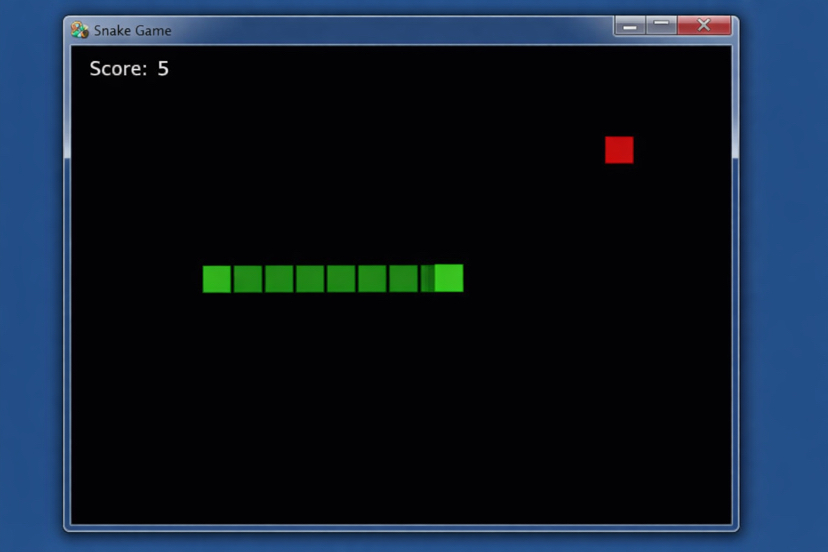
✅ Step 1: Install Pygame
Open terminal / command prompt and run:
pip install pygame
✅ Step 2: Full Working Snake Game Code
Copy this into a file called snake_game.py:
import pygame
import random
import sys
# Initialize pygame
pygame.init()
# Screen size
WIDTH = 600
HEIGHT = 400
BLOCK_SIZE = 20
screen = pygame.display.set_mode((WIDTH, HEIGHT))
pygame.display.set_caption("Snake Game")
# Colors
BLACK = (0, 0, 0)
GREEN = (0, 255, 0)
RED = (255, 0, 0)
WHITE = (255, 255, 255)
clock = pygame.time.Clock()
font = pygame.font.SysFont("Arial", 25)
def draw_snake(snake):
for block in snake:
pygame.draw.rect(screen, GREEN, (block[0], block[1], BLOCK_SIZE, BLOCK_SIZE))
def message(text):
msg = font.render(text, True, WHITE)
screen.blit(msg, [WIDTH // 6, HEIGHT // 3])
def game():
snake = [[100, 100], [80, 100], [60, 100]]
direction = "RIGHT"
food = [random.randrange(0, WIDTH, BLOCK_SIZE),
random.randrange(0, HEIGHT, BLOCK_SIZE)]
score = 0
game_over = False
while not game_over:
screen.fill(BLACK)
for event in pygame.event.get():
if event.type == pygame.QUIT:
pygame.quit()
sys.exit()
if event.type == pygame.KEYDOWN:
if event.key == pygame.K_UP and direction != "DOWN":
direction = "UP"
elif event.key == pygame.K_DOWN and direction != "UP":
direction = "DOWN"
elif event.key == pygame.K_LEFT and direction != "RIGHT":
direction = "LEFT"
elif event.key == pygame.K_RIGHT and direction != "LEFT":
direction = "RIGHT"
head = snake[0].copy()
if direction == "UP":
head[1] -= BLOCK_SIZE
elif direction == "DOWN":
head[1] += BLOCK_SIZE
elif direction == "LEFT":
head[0] -= BLOCK_SIZE
elif direction == "RIGHT":
head[0] += BLOCK_SIZE
# Check wall collision
if head[0] < 0 or head[0] >= WIDTH or head[1] < 0 or head[1] >= HEIGHT:
game_over = True
# Check self collision
if head in snake:
game_over = True
snake.insert(0, head)
# Check food collision
if head == food:
score += 1
food = [random.randrange(0, WIDTH, BLOCK_SIZE),
random.randrange(0, HEIGHT, BLOCK_SIZE)]
else:
snake.pop()
# Draw food
pygame.draw.rect(screen, RED, (food[0], food[1], BLOCK_SIZE, BLOCK_SIZE))
# Draw snake
draw_snake(snake)
# Display score
score_text = font.render(f"Score: {score}", True, WHITE)
screen.blit(score_text, [10, 10])
pygame.display.update()
clock.tick(10)
screen.fill(BLACK)
message("Game Over! Press Q to Quit or C to Play Again")
pygame.display.update()
while True:
for event in pygame.event.get():
if event.type == pygame.QUIT:
pygame.quit()
sys.exit()
if event.type == pygame.KEYDOWN:
if event.key == pygame.K_q:
pygame.quit()
sys.exit()
if event.key == pygame.K_c:
game()
game()
🎮 How to Run
python snake_game.py
🎯 Controls
⬆ Arrow Up
⬇ Arrow Down
⬅ Arrow Left
➡ Arrow Right
🚀 Next Level (Optional Upgrades)
Since you’re interested in blockchain gaming, next we can:
✅ Add score saving to database
✅ Convert into Play-to-Earn version
✅ Add wallet login simulation
✅ Add multiplayer mode
✅ Convert to Web version for Solana integration