If someone reaches out to you claiming they work with Binance – especially in roles like business development and partnerships, account management, and customer support – check them using Binance Verify. If they cannot be verified, treat the contact as untrusted, and do not proceed.
If anyone guides you to download and open files, share screenshots of your account pages, scan QR codes to log in, enable remote control or screen sharing, share your password, or click unknown links, stop immediately.
Do not open compressed files or run attachments sent by strangers, even if they look like normal documents. If you have already opened a suspicious file or shared screenshots, contact Binance Customer Support and take immediate account-security steps.
Impersonators often try to look routine: a “Binance” message about rebates, an “account manager” offering help, or “customer support” asking you to verify something quickly. The risk usually starts when the conversation pushes you to take a specific action, such as downloading a file, sharing account screenshots, scanning a QR code to log in, clicking an unknown link, or enabling remote access.
This guide walks through a real case of how an “application form” led to account takeover, the three signals that commonly show up in such imposter attempts, and how to use Binance Verify to confirm whether a contact or channel is actually official before you proceed.
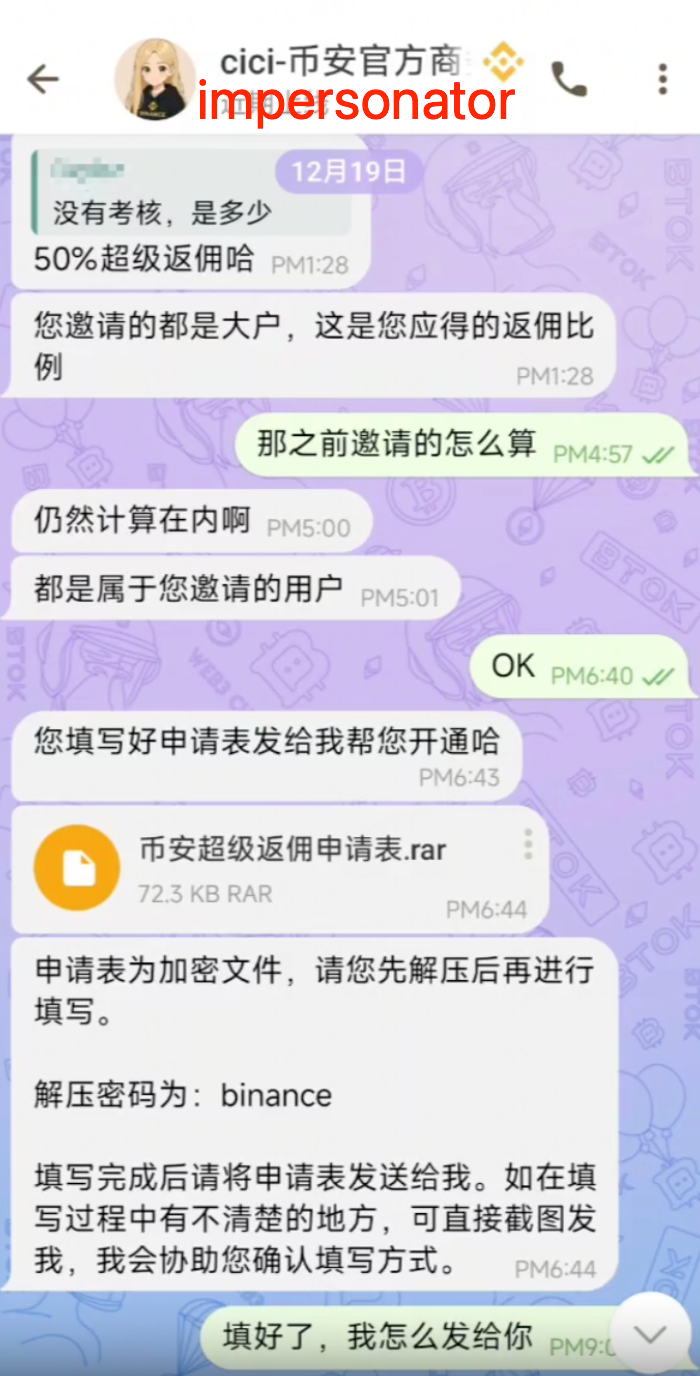
In a recent case, a user was contacted by someone impersonating a Binance business representative on a social platform. The impersonator claimed they could “upgrade the rebate rate,” and sent a compressed file labeled as a “Binance rebate application form,” instructing the user to download, unarchive, and fill it out.
The user followed the instructions, opened the file, and shared screenshots – including an account assets page – with the impersonator, who then claimed the “upgrade” required a 50,000 USDT deposit. The user said they did not have that balance at the time. This likely reduced the impersonator’s incentive to act immediately, but they stayed in contact.
User: No review needed. How much is it?
Impersonator: 50% super rebate.
User: Then how do we calculate the previous referrals?
Impersonator: Those count as well.
Impersonator: They’re all users you referred.
User: OK.
Impersonator: After you fill out the application form, send it to me, and I’ll help you get it activated.
Impersonator (file): Binance Super Rebate Application Form.rar (72.3 KB, RAR)
Impersonator: The application form is an encrypted file. Please unzip it first and then fill it out.
Impersonator: Unzip password: binance
Impersonator: After you’ve completed it, please send the application form to me. If anything is unclear while filling it out, you can send me a screenshot, and I’ll help confirm how to complete it.
User: I’ve filled it out. How do I send it to you?
Two days later, the impersonator contacted the user again and claimed a “special approval” had been obtained, allowing a lower balance to proceed. The user then deposited 30,000+ USDT and sent a screenshot as confirmation.
After that, the impersonator guided the user through a QR-code login step. By scanning a QR code generated by the attacker, the user inadvertently authorized a login session on their account. The impersonator then enabled remote control and moved the assets out of the account. Binance subsequently took risk-control actions on the suspicious accounts involved.
The next day, the user contacted Binance Customer Support and reported the issue. Based on the compressed file the user provided, Binance Security’s analysis found a file that appeared to be a normal .docx document, but actually functioned as a .dll – a pattern consistent with malware delivery.
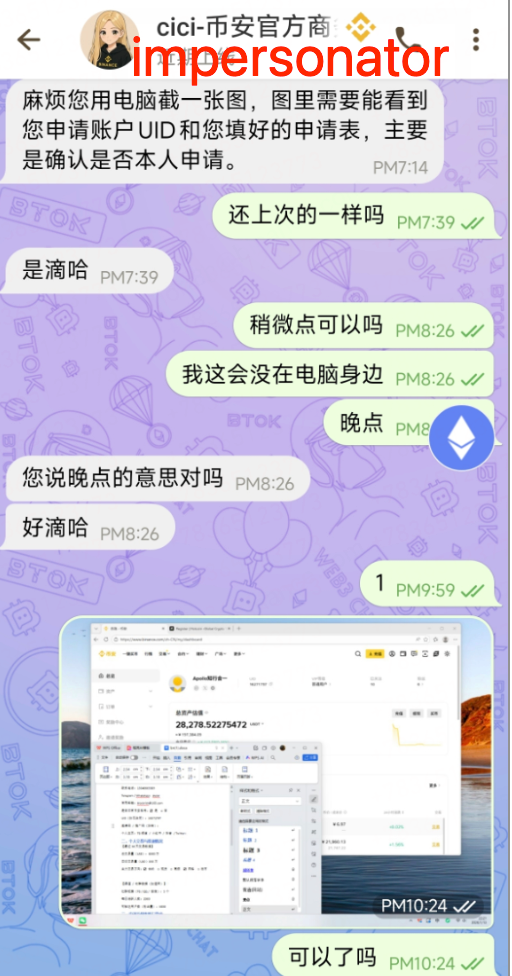
Impersonator: Please take a screenshot on your computer. The screenshot needs to show the UID of the account you’re applying with and the completed application form, mainly to confirm the application is made by you.
User: Same as last time?
Impersonator: Yes.
User: Can it be a bit later?
User: I’m not at my computer right now.
User: Later.
Impersonator: When you say “later,” you mean later tonight, right?
Impersonator: OK.
User: (sends screenshot)
User: Is this OK?
Social engineering works by offering a story that sounds plausible. The story could be rebates, promotions, account upgrades, document updates, security checks, or “urgent handling.” Many users focus on whether the story sounds real.
Regardless of the story, it is usually what happens next that carries risk. The most common danger steps include downloading and opening files, sending account screenshots, scanning QR codes as instructed, and enabling remote control or screen sharing. When a conversation pushes you toward any of these actions, treat it as a security incident rather than a customer-service flow.
Scammers can copy profile photos, display names, and bios. They can also create handles that look nearly identical to real ones. A professional tone, a familiar logo, or a long chat history is not proof.
The same applies to social groups. Large group size does not equal legitimacy. Membership can be inflated with bots or purchased accounts. Don’t rely on avatars, usernames, or group numbers as verification.
Compressed files often contain items named “form,” “application,” or “instructions.” Some are designed to look like normal documents while hiding executable behavior. You may think you are opening a document, but a background process may start running the moment you click.
Similar traps can also arrive as phishing links or spoofed emails that ask you to log in or provide sensitive details. Treat unexpected files and links as untrusted by default.
If you have limited assets at the moment of their initial approach, an impersonator may not act immediately. Instead, they may keep the relationship “warm,” wait for a deposit, ask for a screenshot to confirm funds, then push QR login or remote control once conditions are more “favorable” for them.
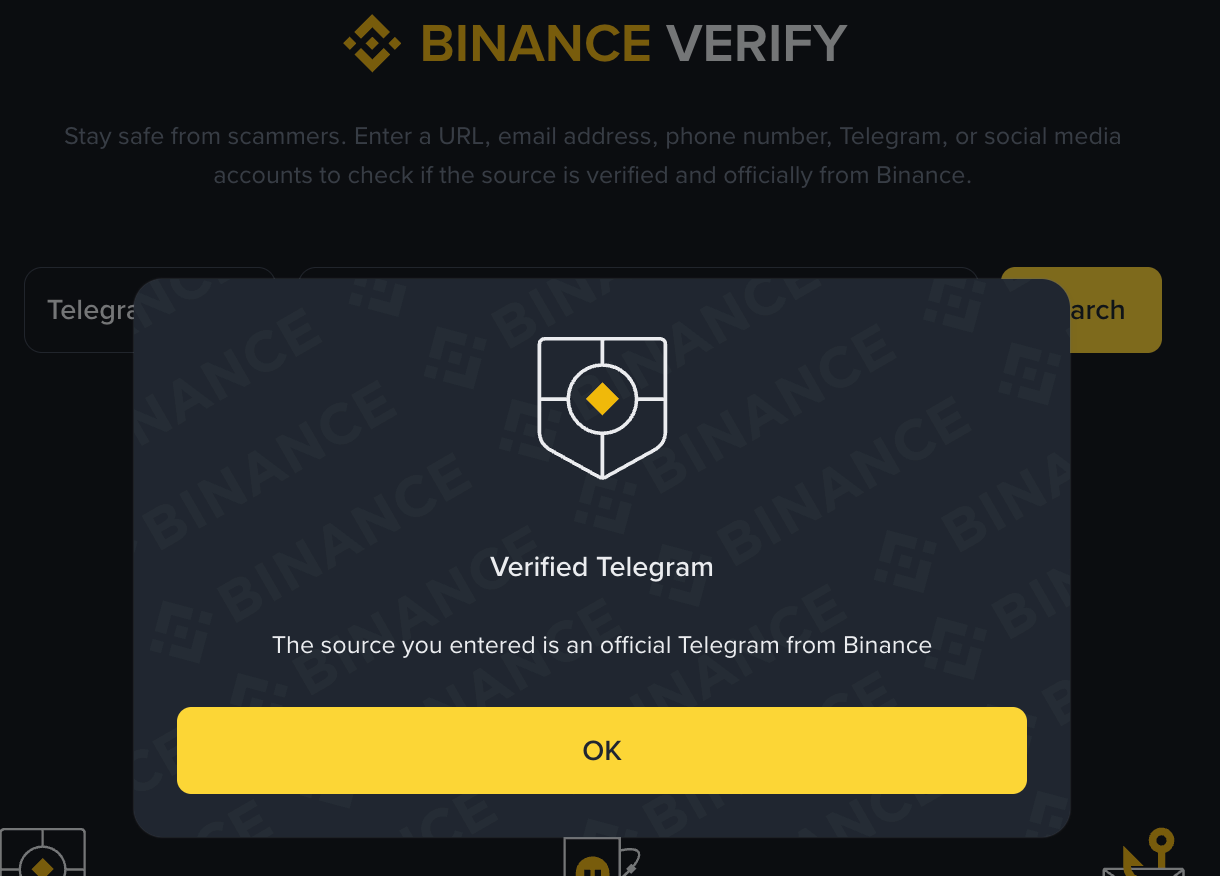
Binance Verify is our platform for checking whether or not a source link, sender’s email, or social handle is from an official, verified Binance entity. If someone who reached out to you claims to represent Binance, please verify their identity using Binance Verify. For detailed instructions on how to use the tool, visit FAQ: What Is Binance Verify?.
If they cannot be verified there, treat the contact as untrusted, and do not proceed.
You do not need a Binance account to use Binance Verify. The tool is accessible for everyone to safeguard against scams and phishing attacks.
As a rule, Binance employees will NOT contact you via non-official channels to:
Send you files, compressed packages, installers, or attachments via non-official channels. Red flag: You’re pressured to download or open unsolicited files, especially compressed ones, from unofficial sources.
Ask you to click unknown links to “apply” for rebates, upgrades, or benefits. Red flag: You receive urgent messages urging you to click suspicious links that bypass regular verification processes or offer deals that seem too good to be true.
Request screenshots of your assets, balances, PnL, UID, account pages, or security settings to “qualify” you. Red flag: You’re asked for sensitive account information as a prerequisite for rewards or upgrades – legitimate staff will not require such disclosures.
Ask you to scan QR codes to “verify,” “activate,” or “log in.” Red flag: You’re asked to scan QR codes from unknown or unofficial sources, especially with promises of fast verification or access.
Share a recovery phrase with you, or tell you a recovery phrase for “your wallet,” then ask you to use it. Red flag: Someone claims to provide your “wallet recovery phrase” and instructs you to import or use it – remember that sharing or using recovery phrases outside your own wallet is highly risky.
Read this blog to learn more about Share-Seed-Phrase Scams.
Ask you to send funds to another account or address for any reason (for example, “verification,” “processing,” or “security”). Red flag: You’re pressured to transfer money to unfamiliar wallets or accounts purportedly for verification or security purposes – this is a strong indicator of fraud.
If someone asks you to do any of the above, stop the conversation and verify first.
If you’ve received a file from someone claiming to represent Binance, do not download or open it before verifying the source. If you already opened it, take these actions in order:
Stop interacting with the sender. Do not follow further instructions, click additional links, scan QR codes, or share screenshots.
Check your assets first (quick damage check). Open the Binance app or website directly (do not use any links you were sent) and review: your total balance, recent transactions, withdrawals, conversions, and any transfers between your own accounts. If anything looks unfamiliar, treat it as urgent.
Secure your account immediately. Change your Binance password and reset your security settings (including 2FA) if you suspect being compromised.
Review account access and remove anything you don’t recognize. Check login activity, device management, and active sessions, then remove any unfamiliar devices or sessions.
Scan and clean your device. Run a trusted malware scan. If you suspect the device is compromised, move sensitive activity to a clean device until you are confident that the current device is safe.
Contact Binance Customer Support through official channels and report what happened. Include what platform you were contacted on, what was shared, and the approximate time of the incident.
Impersonation scams are designed to feel routine to anyone who expects business outreach from Binance. Protect yourself by following a simple default: verify identities only through Binance Verify, do not open compressed files or attachments from untrusted sources, and contact Binance Customer Support through official channels if anything feels off.
Early action can reduce risk and help keep your account secure. To confirm whether a person claiming to represent Binance is legitimate, use Binance Verify.
Disclaimer: Digital asset prices can be volatile. The value of your investment may go down or up, and you may not get back the amount invested. This content is for general information only and should not be construed as financial or investment advice. For more information, see our Terms of Use and Risk Warning.