
我先说下我实现的功能,把外网ip 转换成内网,例如:A省的ip我在家可以调用,A的ip无需暴漏在公网上,我在转换成本地socket,利用端口实现指定哪个ip代理.
设备:软路由
软件:
tailscale(ip穿透) +sing-box(服务端)+ mihomo (客户端)
这一套简单,但是会很卡,下面是优化架构
自建tailscale 中继服务器:
derper 监听本地 HTTP + Nginx 做 TLS + WebSocket
软件下载地址:
https://tailscale.com/
https://github.com/SagerNet/sing-box/releases
https://github.com/MetaCubeX/mihomo/releases
下载软件什么的,我就不说了,域名我默认大家都有
下面教程开始:
tailscale 安装 ,用微软邮箱登录,个人免费可以登录15个.
tailscale down && tailscale up 刷新配置
配置:
自定义中继服务器
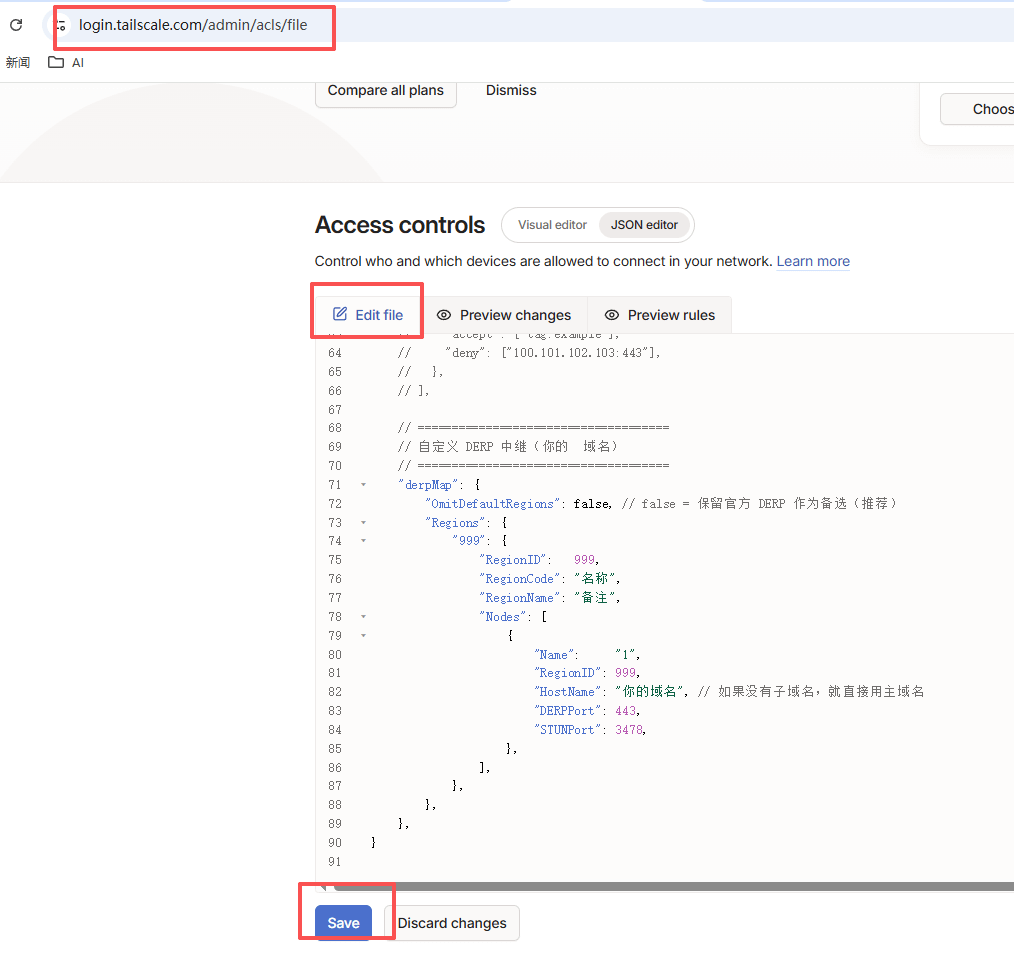
配置:
// =====================================
// 自定义 DERP 中继(你的 域名)
// =====================================
"derpMap": {
"OmitDefaultRegions": false, // false = 保留官方 DERP 作为备选(推荐)
"Regions": {
"999": {
"RegionID": 999,
"RegionCode": "nombre",
"RegionName": "nota",
"Nodes": [
{
"Name": "1",
"RegionID": 999,
"HostName": "dominio",
"DERPPort": 443,
"STUNPort": 3478,
},
],
},
},
},
sing-box
配置:{
"log": {
"level": "info"
},
"inbounds": [
{
"type": "hysteria2",
"tag": "hy2-in", //协议
"listen": "::",
"listen_port": 8443,
"up_mbps": 200,
"down_mbps": 200,
"users": [
{
"password": "contraseña"
}
],
"obfs": {
"type": "salamander",
"password": "contraseña del protocolo"
},
"tls": {
"enabled": true,
"certificate_path": "C:/proxy/sing-box/server.crt",
"key_path": "C:/proxy/sing-box/server.key"
}
}
],
"outbounds": [
{
"type": "direct",
"tag": "direct"
}
]
}
mihomo
# config.yaml
port: 7890
socks-port: 7891
allow-lan: true
mode: regla
log-level: info
# 端口监听配置
listeners:
- name: port-10086
type: mixed
port: 10086
proxy: remote-1
- name: port-10087
type: mixed
port: 10087
proxy: remote-2
# DNS 配置 - 通过代理解析
dns:
enable: true
listen: 0.0.0.0:53
enhanced-mode: fake-ip
fake-ip-range: 198.18.0.1/16
fake-ip-filter:
- '*.lan'
- '*.local'
- 'localhost.ptlogin2.qq.com'
# 用于解析代理服务器地址的 DNS
default-nameserver:
- 223.5.5.5
- 119.29.29.29
# 通过代理查询的 DNS
nameserver:
- https://doh.pub/dns-query
- https://1.1.1.1/dns-query
- https://8.8.8.8/dns-query
# 代理节点配置
proxies:
# 远程机器1
- name: remote-1
type: hysteria2
server: ip
port: 8443
password: contraseña
obfs: salamander
obfs-password: contraseña
skip-cert-verify: true
up: 200
down: 200
# 远程机器2
- name: remote-2
type: hysteria2
server: ip
port: 8443
password:contraseña
obfs: salamander
obfs-password: contraseña
skip-cert-verify: true
up: 200
down: 200
# 代理组
proxy-groups:
- name: PROXY
type: select
proxies:
- remote-1
- remote-2
# 规则配置
rules:
- MATCH,remote-1
Nginx安装
安装配置略过
申请证书
sudo certbot --nginx -d 你的域名
配置nginx:
# =========================
# HTTP -> HTTPS 重定向
# =========================
server {
listen 80;
server_name tepaiyuan.xyz;
location /.well-known/acme-challenge/ {
root /var/www/html;
}
location / {
return 301 https://$host$request_uri;
}
}
# =========================
# HTTPS DERP 服务器
# =========================
server {
listen 443 ssl http2;
server_name tepaiyuan.xyz;
ssl_certificate /etc/letsencrypt/live/你的域名/fullchain.pem;
ssl_certificate_key /etc/letsencrypt/live/你的域名/privkey.pem;
ssl_protocols TLSv1.2 TLSv1.3;
ssl_session_timeout 1d;
ssl_session_cache shared:MozSSL:10m;
ssl_session_tickets off;
ssl_prefer_server_ciphers off;
# ===== DERP WebSocket =====
location /derp {
proxy_pass http://127.0.0.1:8080;
proxy_http_version 1.1;
proxy_set_header Upgrade $http_upgrade;
proxy_set_header Connection "upgrade";
proxy_set_header Host $host;
proxy_set_header X-Real-IP $remote_addr;
proxy_read_timeout 3600s;
proxy_send_timeout 3600s;
}
# 健康检查
location / {
return 200 "DERP Server Running\n";
}
}中继服务器我是用docker,配置成8080端口
目前属于随手笔记,如果有需要可以直接问我,人多我就搞个详细的.